instagram-view-history
Instagram View History
Automatically tracks the posts and reels you view on Instagram so you can find them again later. Everything stays in your browser — no servers, no analytics, no tracking.
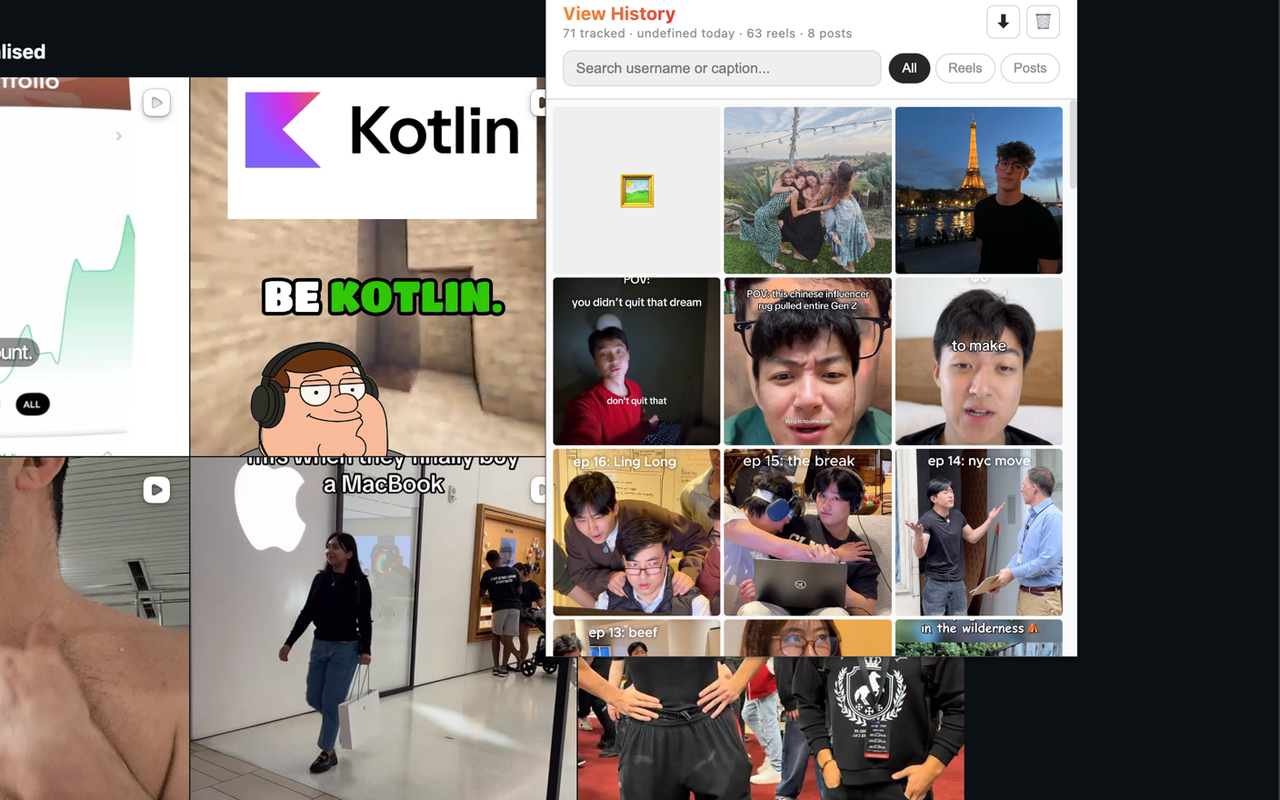
What it does
Scroll Instagram like you normally would. In the background, this extension quietly records the posts and reels that appear in your feed. Open the popup anytime to browse, search, or filter your history.
- Automatic capture — no bookmarking, no “save for later” buttons
- Visual grid, Instagram-style
- Search by username or caption keywords
- Filter: all / posts / reels
- Delete items individually or clear all
- Export history as JSON
Privacy
No data leaves your device. Ever.
All history is stored locally using chrome.storage.local. The extension makes zero outbound network requests of its own and has no analytics. Uninstalling removes everything.
Full details: privacy-policy.md
Install
Until the extension is live on the Chrome Web Store, you can load it manually:
- Clone or download this repo
- Open
chrome://extensions - Enable “Developer mode” (top right)
- Click “Load unpacked” → select this folder
How it works
The extension injects a lightweight interceptor into instagram.com that observes Instagram’s own GraphQL responses as they arrive in the page. When a post or reel response comes through, the relevant metadata (shortcode, thumbnail, caption, author, timestamp) is passed to the background service worker and stored locally.
Source layout:
src/
├── background.js    Service worker — handles storage reads/writes
├── injector.js      Content script — bridges page ↔ extension
├── interceptor.js   Injected into page context — observes network responses
├── popup.html       Popup UI
└── popup.js         Popup logic — rendering, search, filter, export
No bundler, no build step. Plain JS, MV3.
Contributing
Issues and PRs welcome. This is a hobby project — don’t expect enterprise-grade support, but real bug reports will get real responses.
License
MIT — see LICENSE.